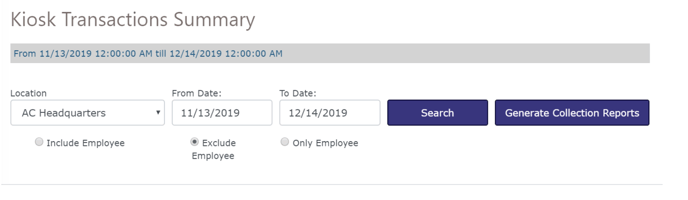
The ‘Associate Card’ feature allows users to tie cards used by employees to those employees. This will make it easier to differentiate between employees’ test transactions and customer transactions when viewing reports.
Card Association The ‘Associate Card’ feature allows users to tie cards used by employees to those employees. This will make it easier to differentiate between employees’ test transactions and customer transactions when viewing reports.
- Activate a card by any method (Paystation, Manual Kiosk, Special cards).
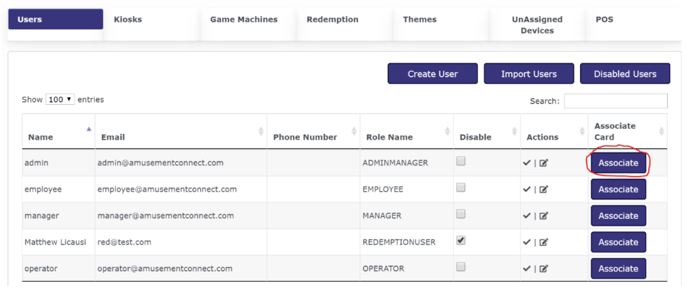
- After selecting your location in Location Wizard, scroll down under the ‘Users’ tab (It will open on this tab by default) and find the employee that will be using this card. Select Associate on the right side of the screen:
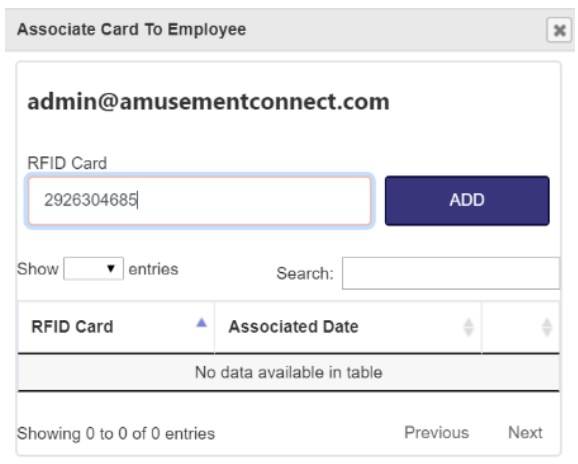
- Enter the RFID card number and select Add:
4. When running reports (Collection, Kiosk, Game, Redemption, Free play Game, etc.), after selecting a location and Start/End Date, you will now have 3 options regarding Employee Cards:
- Include Employee will run the report for cards used by both employee and customers.
- Exclude employee will run the report only for cards used by customers. This is selected by default.
- Only employee will run the reports only for cards associated with the employee.